Blog / Blog

Step-By-Step Instructions To Reset the Honda Tire Warning Light (TPMS)

J.J. Gouin (2)

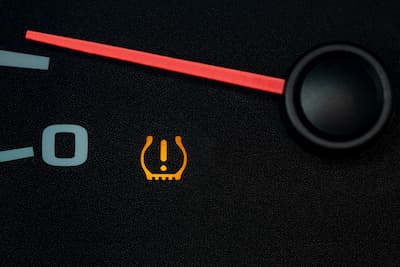
The TPMS, or Tire Pressure Monitoring System, on your Honda’s dashboard can be frustrating. Even after checking and adjusting your tire pressure as the manual suggests, the warning light might stay on.

This can happen for several reasons, like changes in temperature or if the tires were not installed correctly. No matter the cause, you can reset the warning light yourself.

Our team put together this step-by-step guide to help you reset your Honda tire warning light and save you some stress. If these steps don’t solve the problem, it’s best to contact your dealership.

Understanding the Honda TPMS Light

The Tire Pressure Monitoring System helps keep you safe by checking your tire pressure and warning you if any tire is underinflated. If the Honda tire warning light comes on, it means the system has found a possible problem.

Low tire pressure is the most common reason your Honda’s TPMS light turns on. This might happen slowly over time or suddenly if you get a puncture. The light can also come on after a tire rotation or replacement if the system isn’t recalibrated.

If you drive in the Central Valley, big changes in temperature can affect your tire pressure. Cool mornings and warm afternoons might make the TPMS light come on, even if your tires are fine. That’s why it’s important to know what the light means before you reset it.

Safety First: Check Tire Pressure Manually

Always check your tire pressure by hand before you reset the Honda TPMS light. If you reset the system without fixing the real problem, you might miss a safety issue.

Use a good tire pressure gauge and check your tires when they are cold, ideally in the morning before you drive. Compare your readings to the recommended pressure on the driver’s side door jamb, not the number on the tire.

Most Honda cars recommend a tire pressure between 32 and 36 PSI, but this can vary by model. Make sure all four tires are filled correctly, and check the spare if your car has a TPMS sensor for it.

How to Reset the Honda TPMS Light

Once you’ve confirmed that your tire pressure is correct, you can proceed with the reset. Honda TPMS reset instructions vary depending on whether your Honda has a touchscreen display or physical buttons.

Resetting the system lets it recognize your current tire pressure as normal. If you do it right, the warning light should go off after you drive for a bit.

Resetting the TPMS Light on Honda Models with Touchscreen

Many newer Honda models have a touchscreen, which makes resetting the system easy:

  1. Turn the ignition to the “ON” position without starting the engine.
  2. Press the Home button on the touchscreen.
  3. Select Settings, then choose Vehicle.
  4. Tap TPMS Calibration or Tire Pressure.
  5. Select Calibrate and confirm.

Drive as you normally would. The system will recalibrate while you drive, and the Honda tire warning light should turn off within 10 to 20 minutes.

Resetting the TPMS Light on Honda Models without a Touchscreen

If your Honda doesn’t have a touchscreen, use these steps:

  1. Turn the ignition to the “ON” position.
  2. Locate the TPMS button, often found under the dashboard or near the steering column.
  3. Press and hold the button until the TPMS light blinks twice.
  4. Release the button and start the vehicle.

Drive a few miles at a steady speed so the system can finish calibrating.

When to Seek Professional Help

If the light stays on after following all steps, the issue may not be tire pressure. A faulty sensor, a dead sensor battery, or a system malfunction could be causing the warning. Persistent alerts are a sign it’s time for professional diagnostics.

Honda-trained technicians have the tools to accurately identify sensor issues. Scheduling service ensures your TPMS is functioning correctly and keeping you safe.

For reliable help, contact Visalia Honda today or visit us at 1016 S Ben Maddox Way, Visalia, CA 93292-3657.

Frequently Asked Questions

Why is my Honda TPMS light on?

Low tire pressure is the most common reason your Honda's TPMS light turns on. This might happen slowly over time or suddenly if you get a puncture. The light can also come on after a tire rotation or replacement if the system isn't recalibrated. Big changes in temperature can also affect your tire pressure and cause the TPMS light to come on even if your tires are fine.

How do I reset the Honda TPMS light on a model with a touchscreen?

Turn the ignition to the ON position without starting the engine. Press the Home button on the touchscreen. Select Settings, then choose Vehicle. Tap TPMS Calibration or Tire Pressure. Select Calibrate and confirm. Drive as you normally would and the Honda tire warning light should turn off within 10 to 20 minutes.

How do I reset the Honda TPMS light on a model without a touchscreen?

Turn the ignition to the ON position. Locate the TPMS button, often found under the dashboard or near the steering column. Press and hold the button until the TPMS light blinks twice. Release the button and start the vehicle. Drive a few miles at a steady speed so the system can finish calibrating.

What tire pressure should Honda tires be set to?

Most Honda cars recommend a tire pressure between 32 and 36 PSI, but this can vary by model. Check the recommended pressure on the driver's side door jamb, not the number on the tire, and check your tires when they are cold, ideally in the morning before you drive.

Image credit: // Shutterstock // J.J. Gouin

Posted in:

Related Posts

After changing the oil, a mechanic pours in the fresh engine oil into the car.

Why Oil Changes Are So Important and How Often You Really Need One

For many drivers, the oil change light on the dashboard can feel like a minor suggestion rather than a critical requirement. However, at Visalia Honda, we understand that routine oil maintenance is the single most important service you can perform to ensure your vehicle remains reliable for years to come. As a proud member of the Groppetti Auto Family, we have served the Visalia community for nearly 25 years with a commitment to excellence and expert care. Understanding the "why" and "when" of oil changes is essential for every Honda owner. The Lifeblood of Your Engine Think of motor oil as the lifeblood of your Honda’s engine. It serves several vital functions that keep your vehicle running smoothly: Lubrication: Your engine consists of thousands of high-speed moving parts. Oil creates a thin, protective barrier between these metal components, preventing friction that would otherwise lead to overheating and mechanical failure. Temperature Regulation: While coolant does much of the heavy lifting, motor oil also helps dissipate heat from the combustion chamber and engine block. Debris Removal: Over time, oil traps microscopic dirt, carbon deposits, and metallic shavings. Without regular changes, these contaminants turn into "sludge," which can clog oil passages and cause internal damage. Understanding Honda’s Recommended Intervals One of the most frequent questions we receive at our service center is: "How often do I really need an oil change?" The answer varies depending on your Honda’s model, year, and the type of oil used. Generally, older Honda models using conventional oil should be serviced every 5,000 to 7,500 miles. However, most modern Hondas are engineered to use full synthetic oil, which offers superior protection and can often extend intervals up to 7,500 or even 10,000 miles. To take the guesswork out of maintenance, many newer models feature the Honda Maintenance Minder™ system. This onboard computer monitors your driving habits, engine temperature, and ambient conditions to notify you exactly when your oil life reaches a critical percentage. The Central Valley Factor: Visalia Driving Conditions Why Oil Changes Are So Important and How Often You Really Need One | Visalia Honda Learn why regular oil changes are essential for your Honda, how often to schedule them, and how Visalia Honda keeps your engine running smoothly and efficiently. Drivers in the San Joaquin Valley face unique challenges. In Visalia, our summer temperatures frequently soar above 100 degrees. High heat thins the oil and causes it to break down faster. Additionally, frequent stop-and-go driving on Ben Maddox Way or commuting on Highway 99 is considered "severe driving" by most manufacturer standards. If you spend significant time idling in traffic or driving in extreme heat, your Honda may require more frequent oil changes to maintain peak efficiency and prevent premature wear. The Risks of Skipping Service Ignoring your oil change schedule is a gamble with your vehicle’s longevity. The risks include: Decreased Fuel Efficiency: As oil thickens into sludge, the engine has to work harder, burning more fuel in the process. Voided Warranties: Failure to follow the manufacturer’s recommended maintenance schedule can complicate warranty claims should a major engine issue arise. Catastrophic Engine Failure: Without lubrication, engine parts can weld together due to friction, leading to a total engine seizure that costs thousands to repair. The Visalia Honda Advantage When you bring your vehicle to Visalia Honda, you aren’t just getting an oil change; you are getting certified expertise. We emphasize the use of Genuine Honda Motor Oil and Filters. Unlike generic aftermarket filters, Genuine Honda filters are designed specifically for your engine’s flow rate and filtration requirements, ensuring a perfect seal and optimal performance. Our factory-trained technicians provide a level of discipline and passion that has defined the Groppetti Auto Family since 1994. We treat every vehicle with the confidence and care it deserves, ensuring you can drive away with peace of mind. Schedule Your Service Today Don’t wait for your engine to show signs of distress. Keep your Honda running like new by staying ahead of your maintenance schedule. Visit our expert team at Visalia Honda for a fast, professional, and educational service experience. Frequently Asked Questions How often should I change my Honda's oil? Older Honda models using conventional oil should be serviced every 5,000 to 7,500 miles. Most modern Hondas use full synthetic oil, which offers superior protection and can often extend intervals up to 7,500 or even 10,000 miles. Many newer models also feature the Honda Maintenance Minder system, which monitors your driving habits and engine conditions to notify you exactly when your oil life reaches a critical percentage. What happens if I skip an oil change on my Honda? Skipping oil changes can lead to decreased fuel efficiency as oil thickens into sludge and forces the engine to work harder. It can also complicate warranty claims if you fail to follow the manufacturer's recommended maintenance schedule, and in severe cases can cause catastrophic engine failure where parts weld together due to friction, leading to a total engine seizure that costs thousands to repair. Why does Visalia's climate affect how often I need an oil change? Visalia summer temperatures frequently soar above 100 degrees, which thins the oil and causes it to break down faster. Frequent stop-and-go driving on Ben Maddox Way or commuting on Highway 99 is considered severe driving by most manufacturer standards. If you spend significant time idling in traffic or driving in extreme heat, your Honda may require more frequent oil changes to maintain peak efficiency and prevent premature wear. What type of oil filter does Visalia Honda use? Visalia Honda uses Genuine Honda Motor Oil and Filters. Unlike generic aftermarket filters, Genuine Honda filters are designed specifically for your engine's flow rate and filtration requirements, ensuring a perfect seal and optimal performance. Image Credit: deepblue4 // Shutterstock

Close up shot of car battery inside the engine.

When to Replace Your Honda Battery

Your Honda is a marvel of engineering, designed to provide years of reliable transportation throughout the Central Valley. However, even the most dependable vehicle relies on a single, critical component to roar to life every morning: the battery. At Visalia Honda, part of the Groppetti Auto Family, we believe in empowering our community with the knowledge needed to maintain their vehicles effectively. Understanding your battery’s lifespan and recognizing the early warning signs of failure can save you from the frustration of an unexpected breakdown. The Lifespan of a Honda Battery On average, a Honda battery lasts between three and five years. However, this timeframe is not set in stone. Several external factors can accelerate wear and tear: Climate: This is especially relevant for our local drivers. Visalia’s scorching summers and significant temperature swings put immense strain on battery chemistry. High heat can cause battery fluid to evaporate, leading to internal damage. Driving Habits: Frequent short trips (under 10 minutes) may not give your alternator enough time to fully recharge the battery. Electronics Usage: Modern Hondas are packed with technology. Charging devices, using high-end audio systems, and leaving interior lights on while the engine is off all draw heavily from the battery’s reserves. Warning Signs Your Battery Is Failing Your Honda will often give you subtle clues before the battery gives up entirely. Keep an eye (and ear) out for these symptoms: Slow Engine Crank: If the engine takes longer than usual to turn over or sounds "sluggish" when you turn the key or push the start button, the battery is likely weak. Dim Lights and Electrical Issues: Dim headlights or flickering dashboard lights are common indicators that the battery is struggling to provide sufficient power. Dashboard Warning Lights: The battery lamp or the "Check Engine" light may illuminate when the system detects a voltage irregularity. Physical Corrosion: If you pop the hood and notice a white, ashy substance on the metal terminals, that’s corrosion. It can create resistance and prevent the battery from charging or discharging properly. How to Check Your Battery Health Safely While a professional diagnosis is always best, you can perform a visual inspection at home: Ensure the engine is off. Check the casing: Look for signs of bloating or swelling, which usually happen due to extreme heat exposure. Inspect the terminals: Ensure the cables are tight and free of excessive buildup. If you notice any of these issues, it is vital to have the battery tested by a professional before you find yourself stranded. Why Choose Visalia Honda for Replacement? When it is time for a new battery, where you go matters. Since 1994, the Groppetti Auto Family has been built on the "drive" of discipline, courage, passion, and confidence. We apply these values to every service appointment. Choosing Visalia Honda ensures you receive a Genuine Honda Battery. These batteries are specifically engineered to meet your vehicle's exact cold-cranking amps (CCA) and reserve capacity requirements. Our factory-trained technicians ensure the installation is seamless, protecting your vehicle’s complex electrical system and ensuring your warranty remains intact. Schedule Your Service Today Don't wait for a "click-click-click" sound to realize your battery has reached its end. Whether you are heading to work or taking a weekend trip to the Sierras, ensure your Honda is ready for the road. Contact us at Visalia Honda today to schedule a battery health check or replacement. Image Credit: Mantas D // Shutterstock

si-2 (1)

Honda Remote Engine Start: A Comprehensive Guide

Honda's Remote Engine Start lets drivers in Visalia enjoy a car that’s already at the perfect temperature, whether warming up on chilly winter mornings or cooling down during summer’s heat. Available on various Honda models, the system allows for remote engine operation while locking the doors for added convenience. Using either the key fob or the HondaLink app, you can start, stop, or extend the engine’s runtime with ease while keeping safety and battery considerations in mind. Knowing how to use this feature allows you to enhance every drive with comfort and convenience. Step Into Comfort Before You Drive Honda's Remote Engine Start is all about making your drive more comfortable and convenient. Imagine stepping into a car that's already at the perfect temperature, whether it's a hot summer day or a chilly winter morning in Visalia. This feature allows you to start your car's engine remotely, ensuring the cabin is just right when you're ready to go. While the engine is running, your car remains secure with the doors locked. The system also smartly adjusts the climate control to heat or cool the cabin based on the outside temperature. This is especially helpful in Visalia's extreme weather conditions. Knowing how to use this feature means you can enjoy a more pleasant drive every time you drive. How to Use Honda Remote Start: Step-by-Step Instructions Getting started with Honda's Remote Engine Start is simple. These Honda remote start instructions will guide you through using either the key fob or the HondaLink app to pre-warm or cool your cabin before you drive. Using the Honda Key Fob for Remote Start To start your car remotely with the key fob, first ensure all doors are locked by pressing the lock button. Then, press and hold the button with the circular arrow symbol for a few seconds. The engine will start, and you'll see the lights flash as confirmation. To turn off the engine, just press and hold the remote start button again. This method is ideal for setting the cabin temperature before you head out. Using the HondaLink App for Remote Start If you prefer using your smartphone, the HondaLink app offers a handy alternative. After downloading and setting up the app, navigate to the remote start option. With a tap, you can start or stop the engine and even extend the run time if needed. The app enables greater control from a distance, making it ideal for those who prefer to plan ahead. Honda Models Offering Remote Start Honda's Remote Start feature is available on popular models like the Accord, Civic, CR-V, Pilot, and Ridgeline. Each model offers its own set of features, but they all include the convenience of starting your car remotely. When shopping for a new Honda, check the specific model and trim to ensure it includes Remote Start, as availability can vary. Safety and Battery Tips Honda designed Remote Engine Start for convenience, but following a few precautions helps you operate it smoothly and safely. The system will not start if the hood is open or the vehicle is not in park. Parking in a well-ventilated area helps prevent carbon monoxide buildup. To protect battery life, avoid repeatedly using Remote Start during extreme heat or cold, and schedule regular battery checks to maintain reliable performance. Following these simple practices lets you enjoy a comfortable cabin without unexpected interruptions. Comfort and Convenience, Ready When You Are The Honda Remote Engine Start feature adds comfort and convenience to your drive, especially in Visalia's changing weather. It lets you adjust your car's temperature before you even get in. If you're interested in this feature, visit Visalia Honda for more information. Whether you need help activating or troubleshooting, the team at Visalia Honda is ready to assist you in getting the most out of your vehicle's technology.