

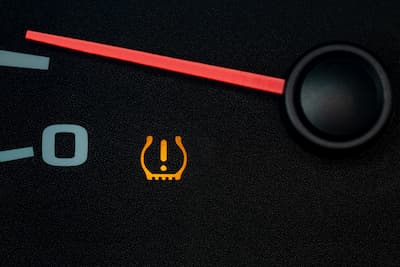
The TPMS, or Tire Pressure Monitoring System, on your Honda’s dashboard can be frustrating. Even after checking and adjusting your tire pressure as the manual suggests, the warning light might stay on.
This can happen for several reasons, like changes in temperature or if the tires were not installed correctly. No matter the cause, you can reset the warning light yourself.
Our team put together this step-by-step guide to help you reset your Honda tire warning light and save you some stress. If these steps don’t solve the problem, it’s best to contact your dealership.
Understanding the Honda TPMS Light
The Tire Pressure Monitoring System helps keep you safe by checking your tire pressure and warning you if any tire is underinflated. If the Honda tire warning light comes on, it means the system has found a possible problem.
Low tire pressure is the most common reason your Honda’s TPMS light turns on. This might happen slowly over time or suddenly if you get a puncture. The light can also come on after a tire rotation or replacement if the system isn’t recalibrated.
If you drive in the Central Valley, big changes in temperature can affect your tire pressure. Cool mornings and warm afternoons might make the TPMS light come on, even if your tires are fine. That’s why it’s important to know what the light means before you reset it.
Safety First: Check Tire Pressure Manually
Always check your tire pressure by hand before you reset the Honda TPMS light. If you reset the system without fixing the real problem, you might miss a safety issue.
Use a good tire pressure gauge and check your tires when they are cold, ideally in the morning before you drive. Compare your readings to the recommended pressure on the driver’s side door jamb, not the number on the tire.
Most Honda cars recommend a tire pressure between 32 and 36 PSI, but this can vary by model. Make sure all four tires are filled correctly, and check the spare if your car has a TPMS sensor for it.
How to Reset the Honda TPMS Light
Once you’ve confirmed that your tire pressure is correct, you can proceed with the reset. Honda TPMS reset instructions vary depending on whether your Honda has a touchscreen display or physical buttons.
Resetting the system lets it recognize your current tire pressure as normal. If you do it right, the warning light should go off after you drive for a bit.
Resetting the TPMS Light on Honda Models with Touchscreen
Many newer Honda models have a touchscreen, which makes resetting the system easy:
- Turn the ignition to the “ON” position without starting the engine.
- Press the Home button on the touchscreen.
- Select Settings, then choose Vehicle.
- Tap TPMS Calibration or Tire Pressure.
- Select Calibrate and confirm.
Drive as you normally would. The system will recalibrate while you drive, and the Honda tire warning light should turn off within 10 to 20 minutes.
Resetting the TPMS Light on Honda Models without a Touchscreen
If your Honda doesn’t have a touchscreen, use these steps:
- Turn the ignition to the “ON” position.
- Locate the TPMS button, often found under the dashboard or near the steering column.
- Press and hold the button until the TPMS light blinks twice.
- Release the button and start the vehicle.
Drive a few miles at a steady speed so the system can finish calibrating.
When to Seek Professional Help
If the light stays on after following all steps, the issue may not be tire pressure. A faulty sensor, a dead sensor battery, or a system malfunction could be causing the warning. Persistent alerts are a sign it’s time for professional diagnostics.
Honda-trained technicians have the tools to accurately identify sensor issues. Scheduling service ensures your TPMS is functioning correctly and keeping you safe.
For reliable help, contact Visalia Honda today or visit us at 1016 S Ben Maddox Way, Visalia, CA 93292-3657.
Frequently Asked Questions
Why is my Honda TPMS light on?
Low tire pressure is the most common reason your Honda’s TPMS light turns on. This might happen slowly over time or suddenly if you get a puncture. The light can also come on after a tire rotation or replacement if the system isn’t recalibrated. Big changes in temperature can also affect your tire pressure and cause the TPMS light to come on even if your tires are fine.
How do I reset the Honda TPMS light on a model with a touchscreen?
Turn the ignition to the ON position without starting the engine. Press the Home button on the touchscreen. Select Settings, then choose Vehicle. Tap TPMS Calibration or Tire Pressure. Select Calibrate and confirm. Drive as you normally would and the Honda tire warning light should turn off within 10 to 20 minutes.
How do I reset the Honda TPMS light on a model without a touchscreen?
Turn the ignition to the ON position. Locate the TPMS button, often found under the dashboard or near the steering column. Press and hold the button until the TPMS light blinks twice. Release the button and start the vehicle. Drive a few miles at a steady speed so the system can finish calibrating.
What tire pressure should Honda tires be set to?
Most Honda cars recommend a tire pressure between 32 and 36 PSI, but this can vary by model. Check the recommended pressure on the driver’s side door jamb, not the number on the tire, and check your tires when they are cold, ideally in the morning before you drive.
Image credit: // Shutterstock // J.J. Gouin
Connect with us


